Where is Excel Options in Microsoft Excel 2007, 2010, 2013, 2016, 2019 and 365?
- Familiar way to open Excel Options if you have Classic Menu for Office
- If you do not have Classic Menu for Office
 |
How to Bring Back Classic Menus and Toolbars to Office 2007, 2010, 2013, 2016, 2019 and 365? |
Familiar way to open Excel Options if you have Classic Menu for Office
If have installed Classic Menu for Office on your computer, you will discover that the classic style drop down menus and toolbar come back into Ribbon under Menus. So you can follow your use habit in Excel 2003 to seek for Excel Options in Microsoft Excel 2007/2010/2013:
- Click the Tools drop down menu under Menus tab;
- Then you will view the Excel Options item. Click it, and you will enter into Excel Options window.

Figure 1: Open Excel Options window from Classic Menu
More Classic Menu for Office...

Open Excel Options from Excel 2007 Ribbon if you do not have Classic Menu for Office
- Click the Office button at the upper-left corner;
- At the bottom, you will view the Excel Options button. Click it into Excel Options Window.
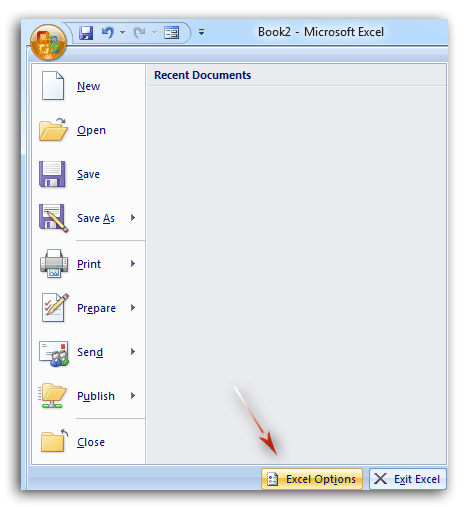
Figure 2: Excel Options button in Excel 2007 Ribbon
Open Excel Options from Excel 2010/2013/2016/2019 Ribbon if you do not have Classic Menu for Office
- Click the File tab jumping into backstage view;
- Then you will view the Options button at left bar. Click it into Excel Options window.
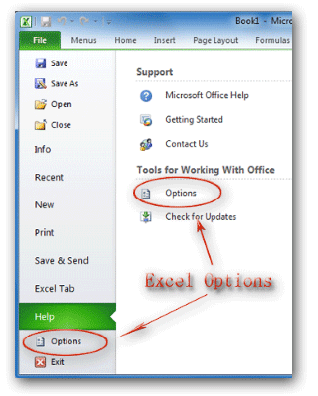
Figure 3: Open Excel Options window from Excel 2010 Ribbon
There is another way to find out the Options button in the backstage view:
- Click the File tab;
- Click the Help button at left bar;
- In the middle pane, you will view the Options button under the Tools for Working With Office.
More Tips for Microsoft Excel 2007, 2010, 2013, 2016, 2019 and 365
- Where is AutoFormat
- Where is Control Toolbox
- Where is Document Properties
- Where is Edit Menu
- Where is Format Menu
- Where is Insert Menu
- Where is Page Break Preview
- Where is Tools Menu
- More...
Classic Menu for Office
Brings the familiar classic menus and toolbars back to Microsoft Office 2007, 2010, 2013, 2016, 2019 and 365. You can use Office 2007/2010/2013/2016 immediately without any training. Supports all languages, and all new commands of 2007, 2010, 2013, 2016, 2019 and 365 have been added into the classic interface.
Classic Menu for OfficeIt includes Classic Menu for Word, Excel, PowerPoint, OneNote, Outlook, Publisher, Access, InfoPath, Visio and Project 2010, 2013, 2016, 2019 and 365.
|
||
 |
Classic Menu for Office 2007It includes Classic Menu for Word, Excel, PowerPoint, Access and Outlook 2007.
|



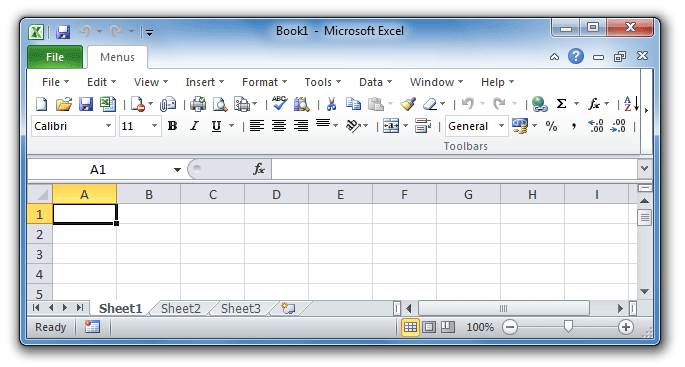
Screen Shot of Classic Menu for Excel