Where is Attach File Control in Microsoft InfoPath 2010 and 2013?
- Easy to find Attach File Control in InfoPath 2010/2013/2016/2019 if you are using Classic Menu for Office
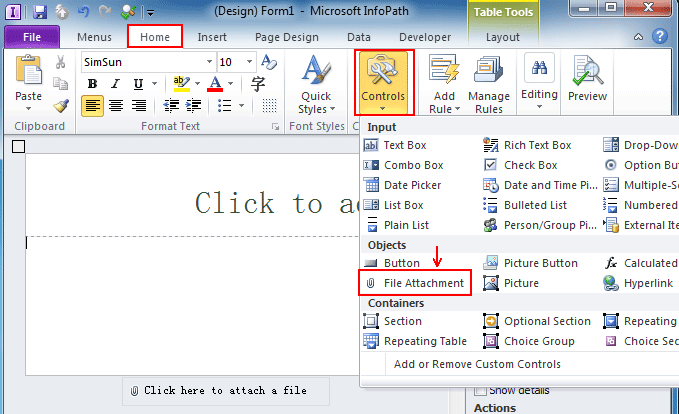
- If you have not Classic Menu for Office (Method: On the Home tab)
Attach file is not only available in Outlook when inserting files in the mail, but also can be inserted as a control on the form template. This feature can be named File Attachment control in Microsoft InfoPath 2010, enabling you to insert files which will be encoded and saved with the form. This article is to tell you how to find file attachment control in InfoPath in two ways.
 |
How to Bring Back Classic Menus and Toolbars to Office 2007, 2010, 2013, 2016, 2019 and 365? |
If you are using Classic Menu for Office...
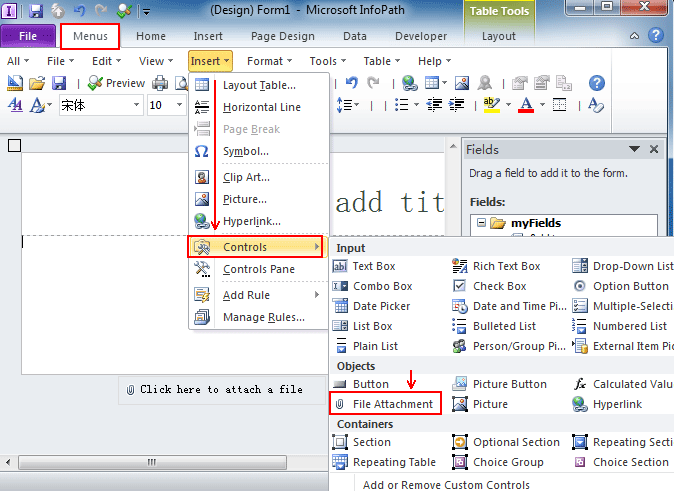
On the Menus tab, click Insert menu and it brings up a drop-down menu. Click Controls and you can see File Attchment in the Objects task pane from the level 2 drop-down menu.
See it below:

If you have not using Classic Menu for Office...
Start Microsoft InfoPath 2010/2013, design a new blank form, on the Home tab, in the Controls group, click the arrow below Controls and it will drop down a menu. And now you can see File Attachment in the Objects task pane from the drop-down menu.
See it below:
Note that for security reasons, not all types of files can be attached to a form, and certain type of files (like .exe, .com, .bat, etc.) are blocked being attached in the form templates.
Classic Menu for Office
|
|