Where is the Notebook Recycle Bin in OneNote 2010 and 2013
Q: Where is the Notebook Recycle Bin in OneNote 2010 and 2013?
A: If you are familiar with Office 2003 menu styles or using the Classic Menu for Office. You can find it by clicking Share>Notebook Recycle Bin> Notebook Recycle Bin in Classic Menu for Office. (See Fig. 1)
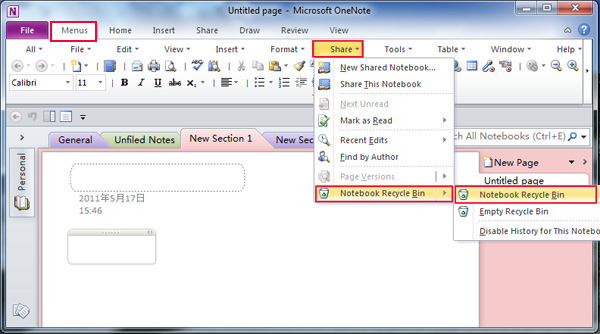
Fig. 1: The "Menus" tab is Classic Menu for Office
A: If you want to find out where is Notebook Recycle Bin in Ribbon interface? You can find it by clicking Share>Notebook Recycle Bin> Notebook Recycle Bin in Ribbon interface. (See Fig. 2)
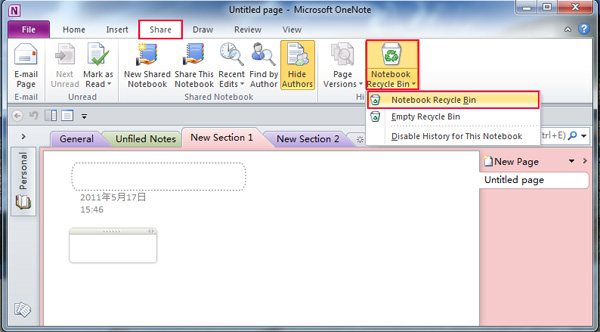
Fig. 2: In Ribbon interface
Classic Menu for Office
Brings the classic menus and toolbars back to Microsoft Office 2007, 2010, 2013, 2016, 2019 and 365. You can use Office 2007/2010/2013/2016 immediately and efficiently, and don't need any trainings or tutorials when upgrading to Microsoft Office (includes OneNote, Word, Excel and other programs) 2007, 2010 or 2013.
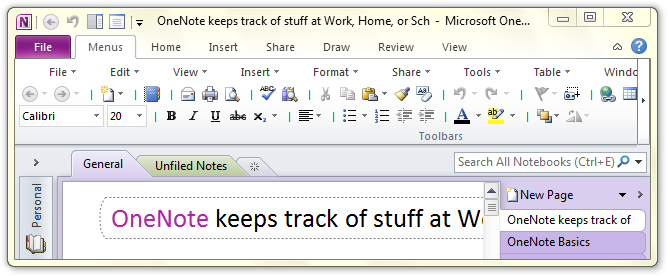
Classic Menu for OneNote 2010
Free Download, Full Features!
Classic Menu for OfficeIt includes Classic Menu for Word, Excel, PowerPoint, OneNote, Access, Outlook, Publisher, InfoPath, Visio and Project 2010, 2013, 2016, 2019 and 365.
|