Where is Templates in Microsoft OneNote 2010 and 2013?
- Easy to find Templates in OneNote 2010/2013/2016/2019 if you are using Classic Menu for Office
- If you have not Classic Menu for Office (Method: New Page)
Microsoft OneNote 2010 and 2013 allows you to apply any built-in templates, even the customized templates. But where is Templates in OneNote 2010 and 2013? The new ribbon interface is new to old users of Microsoft OneNote 2003 and 2007.
 |
How to Bring Back Classic Menus and Toolbars to Office 2007, 2010, 2013, 2016, 2019 and 365? |
If you are using Classic Menu for Office...
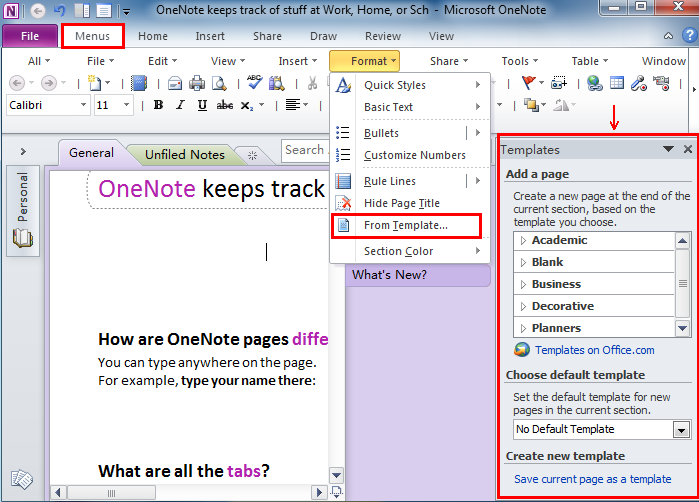
On the Menus tab, click Format menu and it brings up a drop-down menu. Click From Template..., and the Templates window will popup at the rightmost corner.
You can choose to create a new template by yourself or select one from the Choose default template task pane.
See it below:

If you have not using Classic Menu for Office...
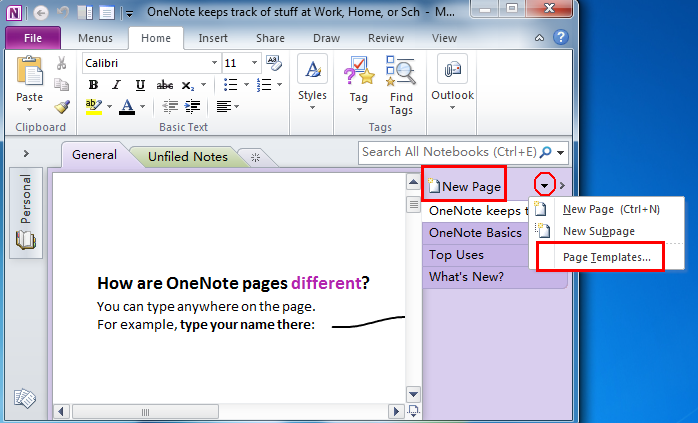
Without the classic style interface, open Microsoft OneNote 2010/2013, click the arrow next to New Page and it will drop down a menu. And now you can see Page Templates at the bottom, click Page Templates, the Templates task pane will display right next to New Page task pane.
See it below:
Classic Menu for Office
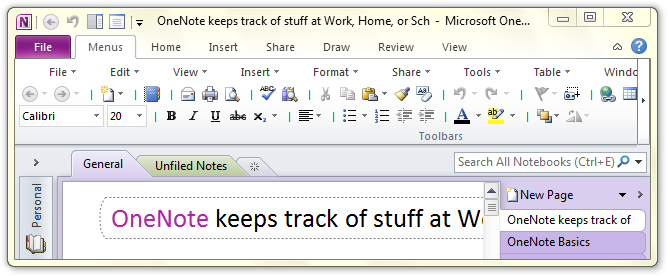
Brings the classic menus and toolbars back to Microsoft Office 2007, 2010, 2013, 2016, 2019 and 365. You can use Office 2007/2010/2013/2016 immediately and efficiently, and don't need any trainings or tutorials when upgrading to Microsoft Office (includes OneNote, Word, Excel and other programs) 2007, 2010 or 2013.
Classic Menu for OneNote 2010
Free Download, Full Features!
Classic Menu for OfficeIt includes Classic Menu for Word, Excel, PowerPoint, OneNote, Access, Outlook, Publisher, InfoPath, Visio and Project 2010, 2013, 2016, 2019 and 365.
|