Where is the Tools menu in Microsoft Outlook 2010 and 2013?
 |
How to Bring Back Classic Menus and Toolbars to Office 2007, 2010, 2013, 2016 and 365? |
Ribbon Interface of Microsoft Outlook 2010 and 2013 are different from the classic style interface of Outlook 2003/XP(2002)/2000, and there is obviously not Tools menu in the ribbon. But provided below still gives you methods to find tools menu whether Classic Menu software installed or not for your Office 2010/2013.
If you are using Classic Menu for Office...
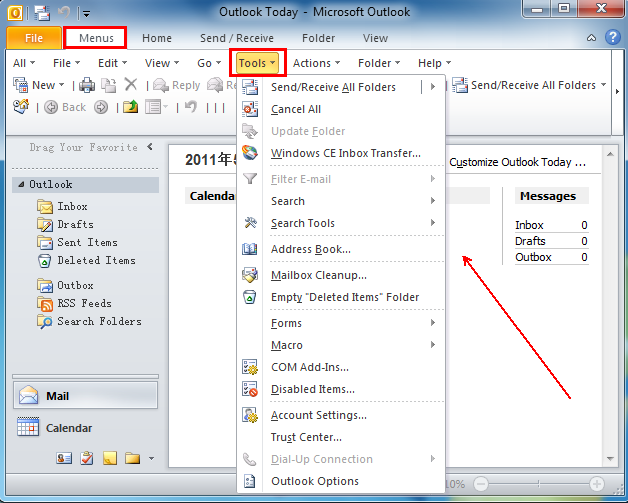
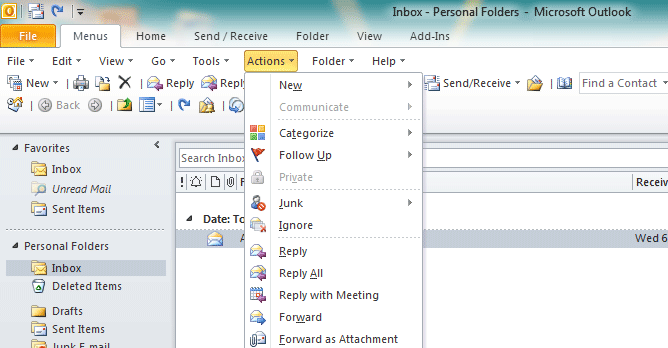
On Menus tab, you can obviously see Tools menu next to the Actions menu on the toolbar. Click Tools and it will bring up the Tools drop-down menu, from which listed the Send/Receive All Folders, Cancel All, Com Add-Ins, Disable Items, Outlook Options, etc.
See it below:

If you are not using Classic Menu for Office...
In Microsoft Outlook 2010 and 2013, the tools menu is no longer listed as a group and the commands and icons of tools are scattered to display at different places in the ribbon. But there are still ways for you to find the commands of the tools menu on the ribbon.
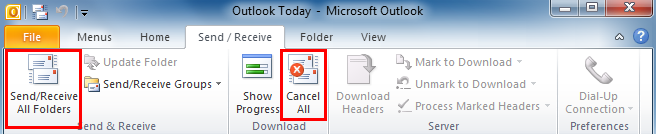
Take Send/Receive All Folders for example, In Microsoft Outlook 2010/2013, on Send/Receive tab, you can see Send/Receive All Folders at the leftmost corner, and Cancel All is listed in the Download group.
See it below:
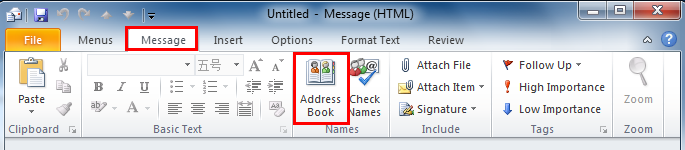
Take Address Book for another example, in Microsoft Outlook 2010/2013, on the Message tab, navigate to Names group, and you can see the Address Book icon next to Check Names.
See it below:
What is Classic Menu for Office/Outlook
Brings the familiar classic menus and toolbars back to Microsoft Office 2007, 2010, 2013, 2016, 2019 and 365, helps users get through the transition from Office 2003 (or 2002, 2000) to Office 2007, 2010 or 2013, and saves your money and energy on training if you are upgrading your Office.
Classic Menu for OfficeIt includes Classic Menu for Word, Excel, PowerPoint, Access, Outlook, OneNote, Publisher, InfoPath, Visio and Project 2010, 2013, 2016, 2019 and 365.
|
||
 |
Classic Menu for Office 2007It includes Classic Menu for Word, Excel, PowerPoint, Access and Outlook 2007.
|