Where is Fragment in Microsoft Visio 2010 and 2013
- It is much easier to find fragment in Visio 2010/2013/2016/2019 if you are using Classic Menu for Office
- If you have not Classic Menu for Office (by Customizing "Not in the Ribbon")
There is not visio shape fragment in the ribbon of Microsoft Visio 2010 and 2013, but this fragment indeed exists in visio 2010/2013. Then, how and where to find the shape fragment just like in Visio 2007 and visio 2003? Don't worry, the following ways will guard you to find Fragment in Visio 2010 and 2013.
 |
How to Bring Back Classic Menus and Toolbars to Office 2007, 2010, 2013, 2016, 2019 and 365? |
If you are using Classic Menu for Office...
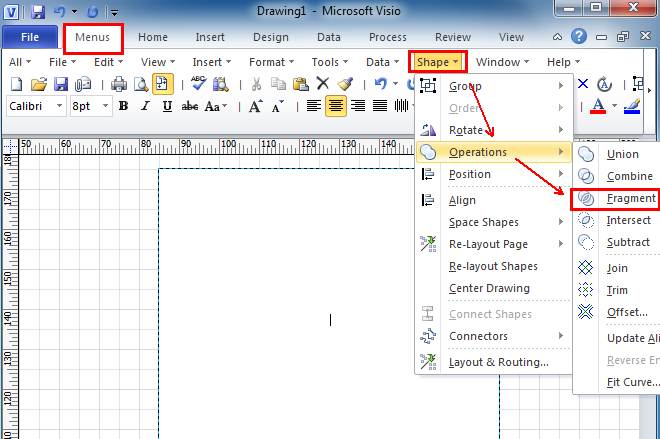
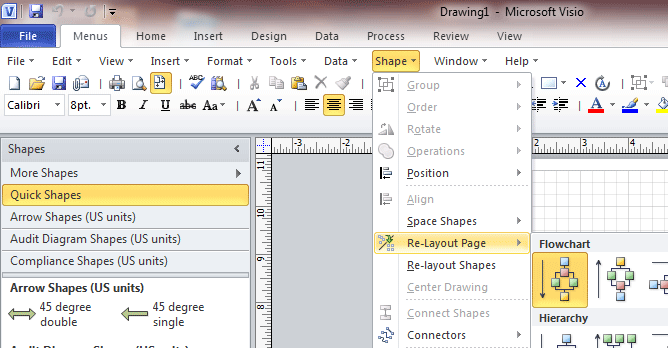
Go to Menus tab, click Shape menu and click Operations from the drop-down men, and then you will see Fragment command from the level 2 drop-down menu.
See it below

If you have not using Classic Menu for Office...
Although you can not immediately see Fragment in the ribbon without the classic menu style interface, you can customize and list fragment command on the ribbon by yourself if this shape fragment command is often in use.
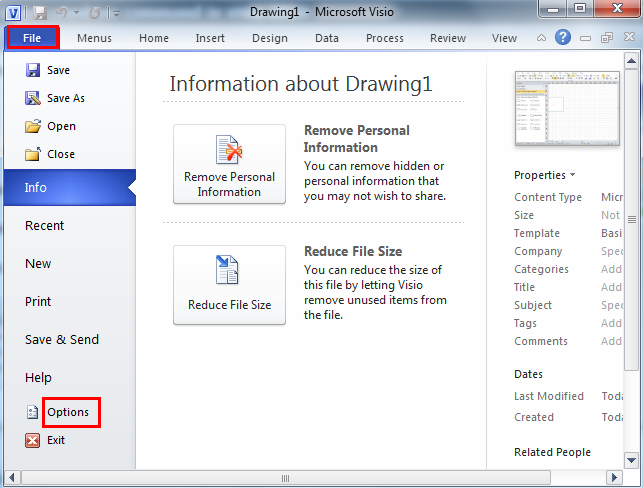
1. In Microsoft Visio 2010/2013, click File tab and then Options, it will bring up the Visio Options window.
See it below:
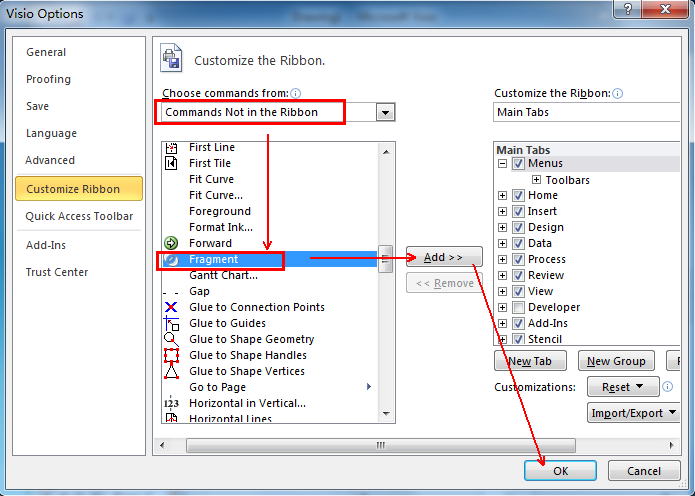
2. Click Customize Ribbon tab in the Visio Options window, and selet Commands Not in the Ribbon from the Choose commands from pull-down box, and then scroll to find the Fragment in the below box. Click New Tab/New Group button to creat the position where you want fragment in the ribbon, then click Add button and OK button.
See it below:
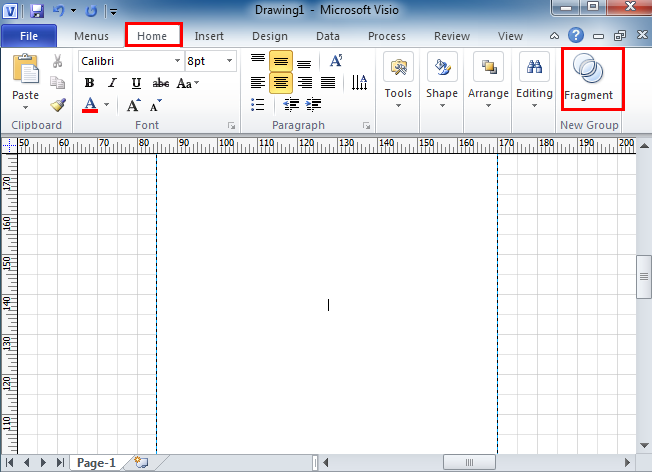
3. Navigate to the ribbon, and now you will see Fragment in New Group added at the left corner under the Home tab.
See it below:
What is Classic Menu for Office?
Classic Menu for Office 2010, 2013, 2016, 2019 and 365 is based on Micorsoft standard add-in technology, and designed for the users who are used to the interface of Office 2003/2002/2000. It shows the familiar classic menus and toolbars in Microsoft Office (includes Visio) 2010/2013, helps users get through the transition from 2003 to 2010, 2013, 2016, 2019 and 365, and saves money and time on training.
- All new features and commands of Visio 2010, 2013, 2016, 2019 and 365 have been added to the menus and toolbars;
- Without any training or tutorials after upgrading, users can work with Visio 2010/2013/2016 immediately.
Classic Menu for Office EnterpriseIt includes Classic Menu for Word, Excel, PowerPoint, OneNote, Outlook, Publisher, Access, InfoPath, Visio and Project 2010, 2013, 2016, 2019 and 365.
|