LanguageEnglishFrenchGermanJapanese
Home > Products > Classic Menu for Access 2007
 

Show classic menus and toolbars on ribbon of Microsoft® Access® 2007


Box of Classic Menu for Access


Download
Purchase


  Classic Menu for Access 2007


Bring back the Access 2003 menus and toolbars to your copy of Microsoft Access 2007.

Frustrated by endless searches for features and commands on the Ribbon? Download and install this software and easily use the classic style main menu, the standard toolbar and formatting toolbar in Access 2007, as you did in Access 2003.

Retrieved the features that hard to find or disappeared in Access 2007: Workgroup Administrator, AutoCorrect Options, Startup...

All new features items of Microsoft Access 2007 have been added into the classic style interface. We design the classic interface not only for the main interface but also for Access Forms, Access Reports and Access Queries. The software works fine with Microsoft Access Runtime version.

60-Day Money Back Guarantee. Free updates (service packs and patches of Classic Menu for Access 2007) and supports for 24 months. Free Download.

Other Products

  Classic Menu for Office 2007 (include Classic Menu for Access, Excel, Outlook,  PowerPoint and Word 2007. Recommended!)
  Classic Menu for Excel 2007
  Classic Menu for Word 2007
  Classic Menu for Outlook 2007
  Classic Menu for PowerPoint 2007

Supports all languages that supported by Microsoft Office 2007: English, French, German, Italian, Spanish, Portuguese, Japanese, Arabic, Korean, Chinese...
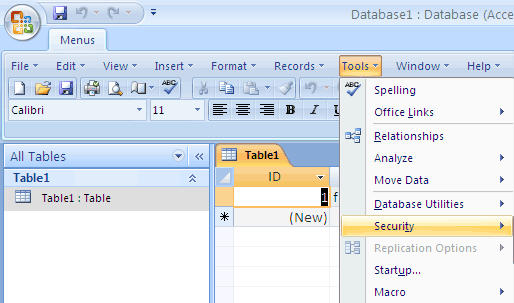
Click to Enlarge

[+] Click to Enlarge

Easy to enable/disable the menus and toolbars.
The Menus tab could be showed on the left of Home tab, or showed as the last tab.
Enable/Disable the All item in the main menu.
Fast start!
The whole package just2.6 MB.
Easy to install and uninstall.
Menu Manager Tool includes in the software.
Very stable and strong!
Download it less than 2 minutes, install it less than half a minute, and show the main menu and toolbars immediately.
You will get a smooth training curve for Access 2007 and use it immediately without tutorial!

   Download     Purchase

Unit Price

US Dollar: 15.99 USD
Euro: 12.5 EUR
Pound Sterling: 9.5 GBP
Canadian Dollar: 17.5 CDN
Australian Dollar: 19.5 AUD


Frequently Asked Questions

Finding Commands and Features of Microsoft Access 2007 System
Using Keyboard Shortcuts in the Microsoft Access 2007 System
Using Quick Access Toolbar in Microsoft Access 2007 System
Using Microsoft Access 2007 System without Ribbon
Retrieve Standard and Formatting Toolbars of Access 2007 System


Editor's Reviews


Finds Us on Microsoft Office

You can Find Our Products on Microsoft Office Downloads / Marketplace.


CNET editors' rating:

If you find yourself spending way too much time trying to locate frequently-used Microsoft Office commands through its newly designed interface, this program is for you...  (www.Download.com is a web site of CNET)

- Reviewed by: CNET

Make Office 2007 Look Like Office 2003

If you're stuck with Office 2007, yet yearning for the familiar menu of Office 2003, you now have an option... 

- PCWorld

Hands on: Show Office 2007 who's the boss

...Sensing an opportunity, third-party software vendors have stepped in with products that either replace or enhance the new Ribbon interface in several Office 2007 applications... Classic Menu adds a tab filled with Office 2003 menus...

- ComputerWorld

Don't get derailed by Office 2007 compatibility issues

#10: Adding on a “classic” user interface... If you want, you can install a third-party add-on that gives you back the old menu bar without sacrificing the new Ribbon. Classic Menu for Office 2007 installs easily...

- TechRepublic


Awards


5 Stars rating on Download3000.com
  www.bluechillies.com


*Microsoft and the Office logo are trademarks or registered trademarks of Microsoft Corporation in the United States and/or other countries.


2001-2010 Addintools. All rights reserved.  Privacy Policy  |  Contact Us
If you have any questions or suggestions about our products or web site, please feel free to submit to us. Thank you very much.