Where is Optional Section in Microsoft InfoPath 2010 and 2013?
- Easy to find Optional Section in InfoPath 2010/2013/2016/2019 if you are using Classic Menu for Office
- If you have not Classic Menu for Office (Method: On the Home tab)
An optional section does not appear on the user's form by default. Where to find and insert Optional Section in Microsoft InfoPath 2010/2013/2016/2019 if we need it? This article provides two methods to search Optional Section with or without useful classic menu add-in.
 |
How to Bring Back Classic Menus and Toolbars to Office 2007, 2010, 2013, 2016, 2019 and 365? |
If you are using Classic Menu for Office...
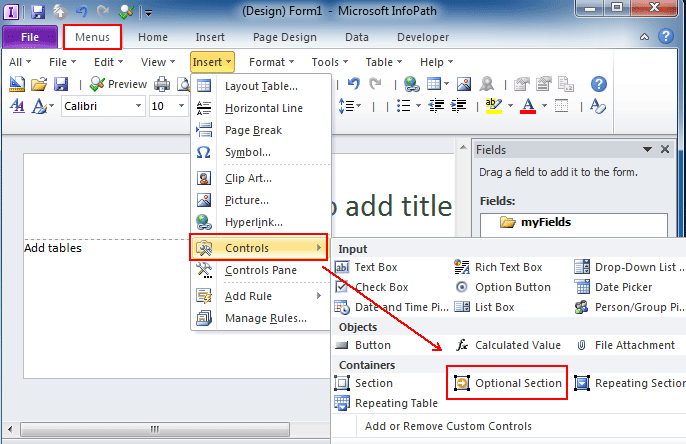
On the Menus tab, click Insert menu and it brings up a drop-down menu. Click Controls and you can see Optional Section in the Containers task pane from the level 2 drop-down menu.
See it below:

If you have not using Classic Menu for Office...
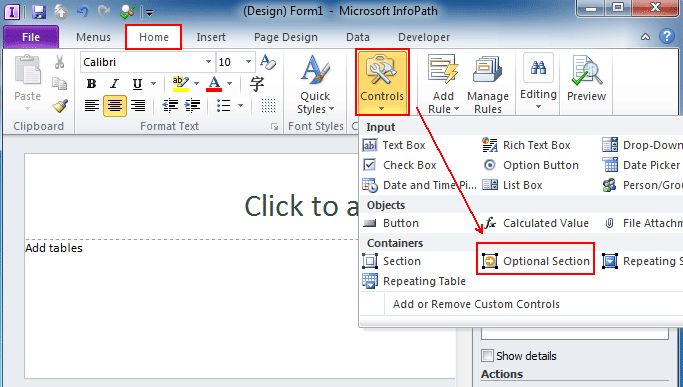
In Microsoft InfoPath 2010, on the Home tab, in the Controls group, click the arrow below Controls and it will drop down a menu. And now you can see Optional Section in the Containers task pane from the drop-down menu.
See it below:
Classic Menu for Office
|
|