


Show Classic Menus and Toolbars in Office 2010, 2013, 2016, 2019 and 365
Classic Menu for Office (32-bit and 64-bit)


 Frustrated by endless searches for features on the ribbon? Download and install this software to bring back the familiar menus and toolbars to Microsoft® Office 2010, 2013, 2016, 2019 and 365 (includes Office 365). The classic view allows you to work with Office 2010, 2013, 2016, 2019 and 365 as if it were Office 2003.
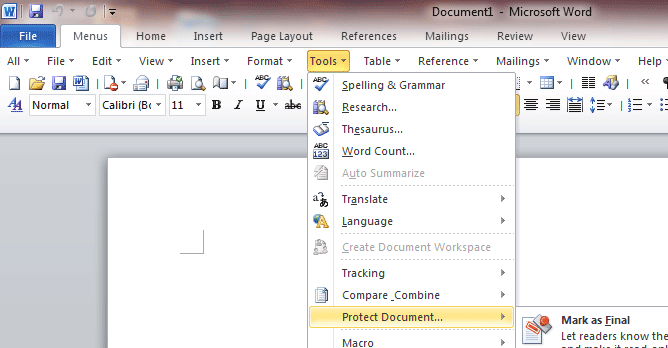
New Features. All new features and commands for Office 2010, 2013, 2016, 2019 and 365 have been added to the menus and toolbars.
More Applications. The suite not only includes Classic Menu for Microsoft  Word,
Word,  Excel and
  PowerPoint, but also includes Classic Menu for Microsoft
  OneNote,
  Outlook,
  Publisher,
  Access and
  InfoPath 2010, 2013, 2016, 2019 and 365.
Save Cost on Training and Tutorials. Give your users a smooth learning curve. They will not require any training and tutorials when upgrading to Office 2010, 2013, 2016, 2019 or 365 (includes Office 365).
- Description
- Screen Shots
- Details
- Awards

New Features of Office 2010, 2013, 2016, 2019 and 365 (365)
All new features and commands for Office 2010, 2013, 2016, 2019 and 365 (includes Office 365) have been added into the classic style interface. The Office 2010/2013/2016/2019 ribbon tabs are kept fully intact so that you can truly get the best of both worlds.
Classic View, Old Look, Original Functions
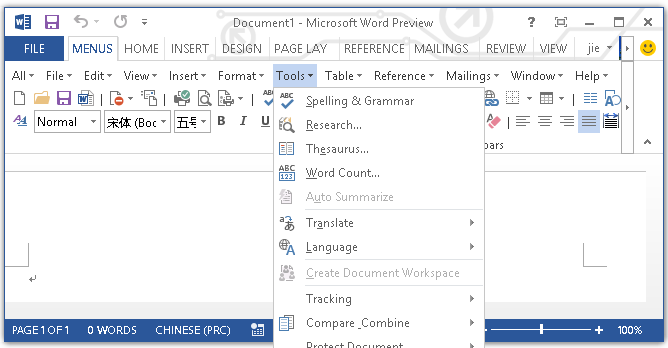
With the Office 2010/2013/2016/2019 classic view and old look, you can still enjoy many features of Office 2003, Office XP and Office 2000 that have been removed from the ribbon in Office 2010, 2013, 2016, 2019 and 365.
64-bit and 32-bit are Available
The Classic Menu for Office not only supports 32-bit Office, but also supports the 64-bit version. It doesn't require the .NET Framework. The file size is small, and it runs faster!
Easy Deploying and Managing in Enterprises and Organizations
We provide a common installation package and the Microsoft Installer Package (MSI) for users from enterprises and organizations. Administrator can change the default setting and enter license info into the package and then deploy the software to all client computers in their enterprise or organization. There is no need to install the software on the computers one by one. The administrator can also change the common setting and apply it for all users on Terminal Server.
International Languages
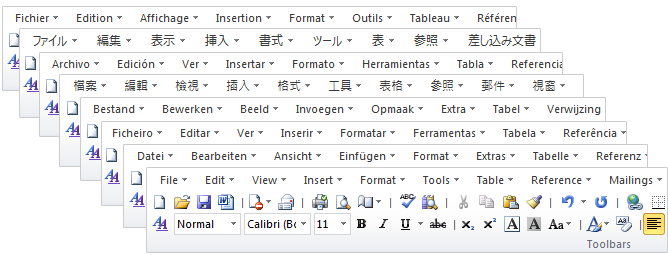
The software supports all languages that are supported by Office 2010/2013/2016/2019 including: English, French, German, Italian, Spanish, Portuguese, Japanese, Dutch, Chinese, and more. If you change the language of Office, the language of the classic menu will automatically be changed. There is no need to change any settings. All languages are included in a single installation package.
100% Satisfaction Guarantee
This is a free download with full features, free support and updates (service packs, patches and higher versions of the Classic Menu for Office)! We offer a 60-day money-back guarantee. Just send an email mail to sales@addintools.com and tell us your order info, and you will receive the refund.Familiar Keyboard Shortcuts
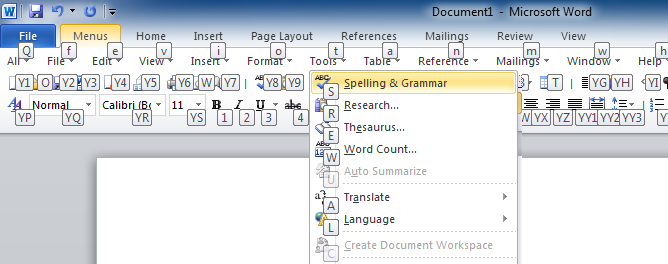
Users can browse the entire menu with keyboard shortcuts. Simply insert Q into the original shortcuts of Office 2003/XP(2002)/2000. For example, since you press Alt + T to open the "Tools" menu in Office 2003, you just need to press Alt, Q, T to open the "Tools" menu in Office 2010, 2013, 2016, 2019 and 365).
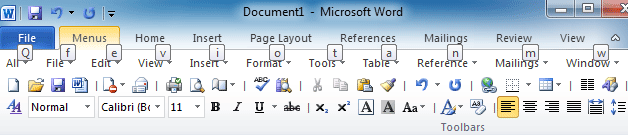

Designed for Office 2010, 2013, 2016, 2019 and 365
The suite includes the Classic Menu for Word, Excel, PowerPoint, Outlook, Access, OneNote, Publisher and InfoPath 2010, 2013, 2016, 2019 and 365. It brings back the old interface to 2010/2013/2016/2019, and makes Office 2010, 2013, 2016, 2019 and 365 look like 2003, XP and 2000. If you also use Project and Visio 2010, 2013, 2016, 2019 and 365, the Classic Menu for Office Enterprise is the better choice.
Increase Productivity and Reduce Training Costs
Help your employees to use Office 2010/2013/2016/2019 without having to learn specialized skills. Your members won't need training or tutorials after upgrading to Office 2010, 2013, 2016, 2019 or 365 programs. Get the software to equip your enterprise or midsize business for success, help increase productivity and reduce training costs.
Another Learning Method
Have you never used Office 2003 (or XP, 2000 or 2007) before? The software will help you learn to use the Office 2010/2013/2016/2019 in another way - Classic User Interface. You can easily browse all features of the menus in text mode, and you won't need to remember the position and style of every icon.
Smooth Learning Curve
Did you use Office 2003 (or XP, 2000 or 2007) before? To those who are not so familiar with the new user interface of Office 2010, 2013, 2016, 2019 or 365, the menus will be great help and provide a smooth learning curve. It will also help improve productivity.
Easy to Install and Uninstall
Installing the software is much easier than installing other add-ins for Office. The installation is just like that of other common software. You can select any classic menu components when you install. You do not need any special skills or technology to use it.
Easy to manage
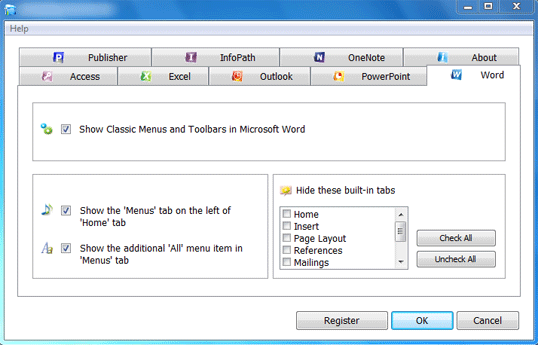
- It is easy to show or hide the tabs of the ribbon.
- It is easy to enable or disable the classic menus and toolbars.
- You can change the position of the classic menus tab.

Fully Compatible
The software is fully compatible with Microsoft® Windows® 11/10/8/7/Vista (32/64), XP, Windows Server from 2003 to latest version (32/64), Windows Terminal (Remote Desktop) Server and Citrix System.
Frequently Asked Questions
- How to deploy Classic Menu for Office in enterprise or organization (with Windows Server 2003)
- How to deploy Classic Menu for Office in company or organization (with Windows Server 2008)
- How to hide classic menus temporarily?
- Is there a way I can use the keyboard shortcuts to access the classic menus?
- More Questions...
Supports All Languages
Classic Menus and Toolbars in Office 2010
Classic menus and toolbars in Office 2013 and 2016
Keyboard Shortcuts
 More Screen Shots
More Demo Movies
Classic Menu Programs |
|
| Classic Menu for Word |  |
| Classic Menu for Excel | |
| Classic Menu for PowerPoint | |
| Classic Menu for OneNote | |
| Classic Menu for Outlook | |
| Classic Menu for Publisher | |
| Classic Menu for Access | |
| Classic Menu for InfoPath | |
| Classic Menu Manager | |
Features List |
|
| Works with 32-bit of Office 2010, 2013, 2016, 2019 and 365 | |
| Works with 64-bit of Office 2010, 2013, 2016, 2019 and 365 | |
| International Languages Support | |
| All Languages Included in The Installation File | |
| All New Features of Office 2010, 2013, 2016, 2019 and 365 are Available | |
| Original Features of Office 2003, XP and 2000 (Which Removed in Office 2010, 2013, 2016, 2019 and 365) are Available | |
| Original Features of Office 2007 (Which Removed in Office 2010, 2013, 2016, 2019 and 365) are Available | |
| Main Menu, Standard Toolbar, Formatting Toolbar | |
| Can Disable Menus and Toolbars | |
| Can Hide the "All" Menu Item | |
| Can Hide the Build-in Tabs on Ribbon | |
| Change the Position of Classic Menu | |
| Familiar Keyboard Shortcuts | |
| Click Once and Browse the Whole Menus | (Browse the "All" menu item) |
| Automatically Repair if the Classic Menus are Disabled Unexpectedly | |
Managing and Deploying |
|
| Administrator Can Disable/Enable Classic Menu for All Users on Computer or Server | |
| Common Users Can Disable/Enable Classic Menu (When Administrator Enabling Classic Menu) | |
| Easy Deploying the Classic Menus to Whole Enterprise (Organization, College...) | |
| Administrator Can Enter the License Info and Change the Setting When Deploying | |
| Administrator Can Change the Default Setting for All Users on Terminal Server or Computer. | |
Support and Service |
|
| 60-Day Money Back Guarantee | |
| Provide .MSI File for Network Deploying | |
| Free Support and Updates | |
 |
 |
Editor's Reviews
CNET editors' rating: |
 |
If you find yourself spending way too much time trying to locate frequently-used Microsoft Office commands through its newly designed interface, this program is for you...
- CNET (www.Download.com is a web site of CNET)
Hands on: Show Office 2007 who's the boss
...Sensing an opportunity, third-party software vendors have stepped in with products that either replace or enhance the new Ribbon interface in several Office 2007 applications... Classic Menu adds a tab filled with Office 2003 menus...
- ComputerWorld
Don't get derailed by Office 2007 compatibility issues
#10: Adding on a "classic" user interface... If you want, you can install a third-party add-on that gives you back the old menu bar without sacrificing the new Ribbon. Classic Menu for Office 2007 installs easily...
- TechRepublic
User's Reviews
I love you - I love you!! I just downloaded the classic toolbar program from you and you are a life saver!!!
I started a new job a couple months ago and haven’t worked on a PC in about 5 years (I’ve been using a Mac) and the Office 2010 toolbars are a joke. After 2 months of frustration from searching for various actions that aren’t on my toolbars, I came across your download. So I just wanted to say THANKS!!!! You have made my life SO much easier!
-Eydie
BioScientific, Inc. / Great Big Plants
Dear Sirs,
I just want to let you know how much I appreciate your Classic Menus program. Without it, I would not be prepared to use Microsoft's latest Office software.
Yours
Andrew Lovell
Hello,
Thank you very much for your very useful advice. Everything worked perfectly.
May I take the opportunity of saying how much I like the Classic menu for Office product. It is absolutely excellent and has saved me many, many hours of frustration. I’ve recommended it to several colleagues, who are equally satisfied.
Regards
John Ashton
Hi,
Thank you so much for your kindness and sense of service. I think your products are wonderful and regularly recommend your add-ins, which make life easier with the impossibly complicated new Office products.
Thank you again,
Dafydd MB
You Rock! It worked like a charm!
You don’t know how much I appreciate this application!!! I still can’t believe that Microsoft doesn’t have this built into their Office 2007 product. You folks to the rescue :o)
Have a great weekend!
Diane
Awesome! Thank you so much for your helpful and speedy response. I followed the instructions for the uninstall and download, and it couldn't have been easier. Word even opened faster than before.
Thanks for great service. I'm sure as more people upgrade to Office 2007, you'll be hearing from lots of folks frustrated by not being able to perform tasks quickly as they did with Office 2003. Feel free to use my "testimonial" for your marketing.
Elizabeth
sales@addintools,
I had been remaking the tool menus, what a pain, does MS know that you do not
change something that already works great. Well, I found Addintools threw a Google
search and installed your software, you don't know how wonderful it is to have my
customized toolbar back after almost a year of their "NEW" look. All is fine now
thanks to your staff at Addintools.
Thank you, Roy










