Where is Tools Menu in Microsoft PowerPoint 2007, 2010, 2013, 2016, 2019 and 365
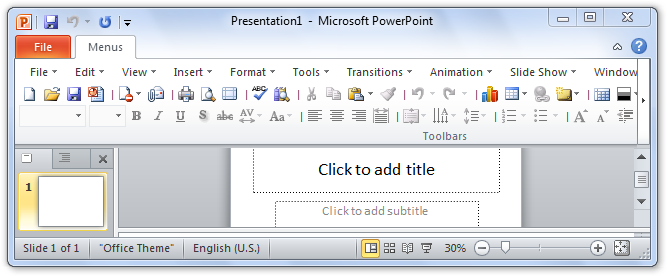
- It is very easy to get Tools menu if you have Classic Menu for Office
- If you do not have Classic Menu
In the new user interface of PowerPoint 2007, 2010, 2013, 2016, 2019 and 365, familiar menus and toolbars are replaced with ribbon. Some users may find out that useful tool menus disappeared, and they can’t find those original commands any way.
 |
How to Bring Back Classic Menus and Toolbars to Office 2007, 2010, 2013, 2016, 2019 and 365? |
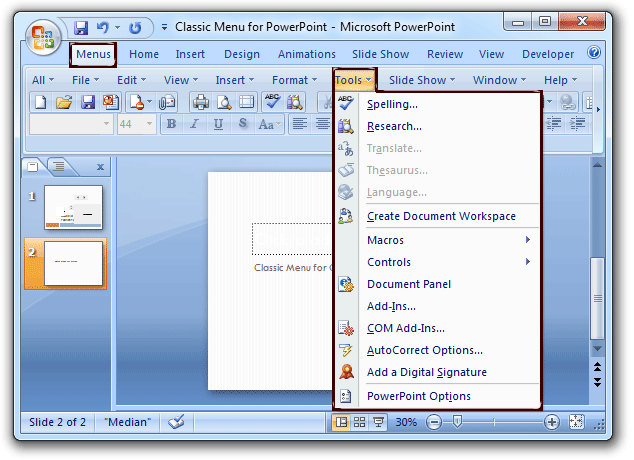
It is very easy to get Tools menu if you have Classic Menu for Office
Classic Menu for PowerPoint will restore your original menus and toolbar of PowerPoint 2003. So just going to the Tools drop down menu, you will view all familiar tools menu commands.
If you do not have Classic Menu
The new ribbon is designed to make users more productive in PowerPoint 2007, 2010, 2013, 2016, 2019 and 365. Commands and functions are separated into different tabs and groups, so that users can find the right features, discover new functionality more easily and efficient. So the rich-functional tools menu commands are moved into other tabs, and there is no more tool menus command group any more.
Here provides the lists of commands that you are already familiar with in PowerPoint 2003, showing you how to accomplish the same results in Office PowerPoint 2007, 2010, 2013, 2016, 2019 and 365.
| NO. | Items in original Tools Menu | Items stay in Ribbon |
| 1 | Spelling | Review > Proofing |
| 2 | Research | |
| 3 | Translate | |
| 4 | Thesaurus | |
| 5 | Language | |
| 6 | Macros | View > Macros |
| 7 | Controls | Developer > Control |
| 8 | Document Pane | Developer > Modify |
| 9 | Add-Ins… | Office button > PowerPoint Options > Add-ins |
| 10 | Com Add-Ins… | |
| 11 | Auto Correct Options | Office button > PowerPoint Options > Proofing |
| 12 | Add a Digital Signature | Office button > Prepare |
| 13 | PowerPoint Option | Office Button |

What is Classic Menu for Office
Brings your familiar classic menus and toolbars back to Microsoft PowerPoint 2007, 2010, 2013, 2016, 2019 and 365. You can use PowerPoint 2007/2010/2013/2016 immediately and efficiently, and don't need any trainings or tutorials when upgrading to Microsoft PowerPoint 2007, 2010, 2013, 2016, 2019 and 365.
Classic Menu for OfficeIt includes Classic Menu for Word, Excel, PowerPoint, OneNote, Outlook, Publisher, Access, InfoPath, Visio and Project 2010, 2013, 2016, 2019 and 365.
|
||
 |
Classic Menu for Office 2007It includes Classic Menu for Word, Excel, PowerPoint, Access and Outlook 2007.
|