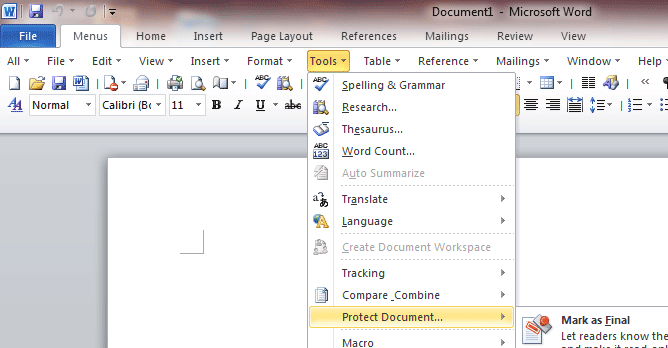
Difference of Toolbars Between Word 2010, Word 2007 and Word 2003 - 1/2
Actually the classic user interface has been replaced by new ribbon interface in Word 2007 and 2010. So the toolbars in Word 2007 and 2010 are unavailable until users install the Classic Menu for Office. The following content shows the difference of standard toolbar between Word 2003, 2007 and 2010. New | Deleted | Moved | Renamed | Improved
The old standard toolbar of Word 2003:

The standard toolbar of Word 2007 (included in Classic Menu for Office 2007):

The standard toolbar of Word 2010 (included in Classic Menu for Office 2010):

New Items
 Save as Word 97...2003 Document: Because file format of Word 2007/2010 is different from Word 97...2003, this feature is very useful and helps user to quickly save document as Word 97...2003 format.
 Page Setup: It is a menu + button. Click the button to open Page Setup dialog, and click the arrow on right will popup a menu to change some properties of page setting.
 Borders and Shading: Customize the borders of the selected cells or text.
 Comments Menu: Add, delete and navigate to previous or next comment.
 References Menu: You can find all features about index, table, footnotes, endnotes, caption and more.
 Tracking Menu: All features about tracking (the changes made to the document).
 Letters and Mailings: All features about mailings and letters.
 Show/Hide More Toolbars: Show or hide more toolbars, for example: Review, tracking... (only available in Word 2007).
 New Drawing: Insert a new drawing, and users can insert any pictures, shapes, word arts, smartarts and charts into the drawing.
Improved Items
 Tables and Borders: Insert or draw a table.
 >>
>>  Document Map: Not only the headings, the pages and searching results are included in the document map.
Deleted Items
 Insert Microsoft Excel Worksheet: You can click Insert > Object to insert an Excel worksheet into the document.
 Full Screen Reading: This item is removed in Word 2007 and restored again in Word 2010.
 Show/Hide Drawing Toolbar: The item is replaced by "Drawing Tools" tab.
What is Classic Menu for OfficeThe software Classic Menu for Office is designed for the people who are accustomed to the old interface of Microsoft Office 2003, XP (2002) and 2000. It brings back the classic menus and toolbars to Microsoft Office (includes Word) 2007, 2010, 2013, 2016, 2019 and 365. The classic view helps the people to smoothly upgrade to the latest version of Office, and work with Office 2007/2010/2013/2016 as if it were Office 2003 (and 2002, 2000).
Screen Shot of Classic Menu for Word
|