Where is the Spell Check in Microsoft Word 2007, 2010, 2013, 2016, 2019 and 365
- Method A - Activate the spell check setting.
- Method B - The fastest way to process.
- Method C - If the Classic Menu for Office is installed (classic interface).
- Method D - If the Classic Menu for Office is not installed (ribbon interface).
The Spell Check function in Word can help you quickly find out the spelling and grammar mistakes in the Word document. There are four simple ways to call Spell Check function in Word 2007, 2010, 2013, 2016, 2019 and 365.
 |
How to Bring Back Classic Menus and Toolbars to Office 2007, 2010, 2013, 2016 and 365? |
A: Activate the Spell Check Setting
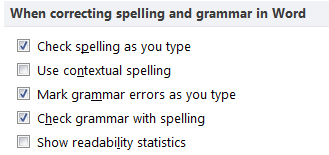
The automatic Spell Check function might be disabled sometimes and users could reactivate it. Please click File tab in Word 2010 and 2013 (or click the Office button in Word 2007) > Word Options > Proofing. If you are using Classic Menu for Office, click Tools > Word Options > Proofing.
See following:
B: Using the Keyboard Shortcut
If you need, just press F7 to call Spelling and Grammar function.
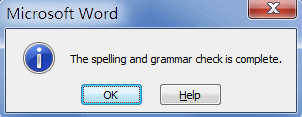
If you want to locate its position on ribbon, please see following content.
C: If the Classic Menu for Office installed
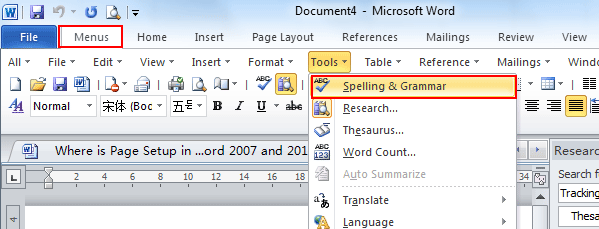
If you have installed Classic Menu for Office to bring back the familiar user interface and make it look like Word 2003/XP(2002)/2000, just click Tools > Spelling and Grammar.
D: If the Classic Menu for Office not installed
If the Classic Menu for Office is not installed, please click Review tab > Proofing group > Spelling and Grammar.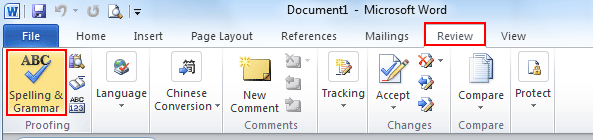
What is Classic Menu for Office
The software Classic Menu for Office is designed for the people who are accustomed to the old interface of Microsoft Office 2003, XP (2002) and 2000. It brings back the classic menus and toolbars to Microsoft Office (includes Word) 2007, 2010, 2013, 2016, 2019 and 365. The classic view helps the people to smoothly upgrade to the latest version of Office, and work with Office 2007/2010/2013/2016 as if it were Office 2003 (and 2002, 2000).
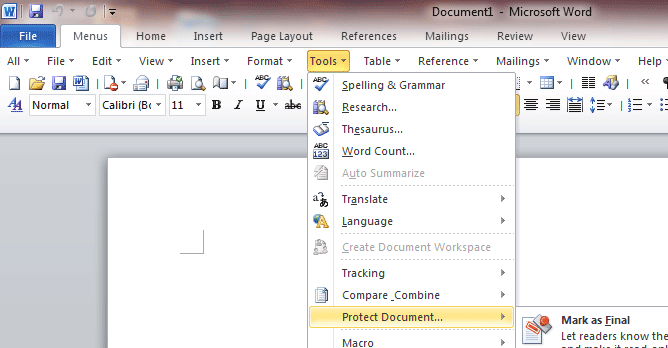
Screen Shot of Classic Menu for Word
- All new features and commands of Office 2007, 2010, 2013, 2016, 2019 and 365 have been added to the menus and toolbars;
- Without any training or tutorials after upgrading, users can work with Office 2007/2010/2013/2016 immediately;
- Easy to find any command items you want to process;
- Easy to show or hide the classic menus, toolbars and ribbon tabs;
- Easy to install and use. Supports all languages. Free download!
Classic Menu for OfficeIt includes Classic Menu for Word, Excel, PowerPoint, OneNote, Outlook, Publisher, Access, InfoPath, Visio and Project 2010, 2013, 2016, 2019 and 365.
|
||
 |
Classic Menu for Office 2007It includes Classic Menu for Word, Excel, PowerPoint, Access and Outlook 2007.
|