


Customize and Change Ribbon Style of Microsoft Office 2007 As You Need

  |
|
 Ribbon Customizer for Office 2007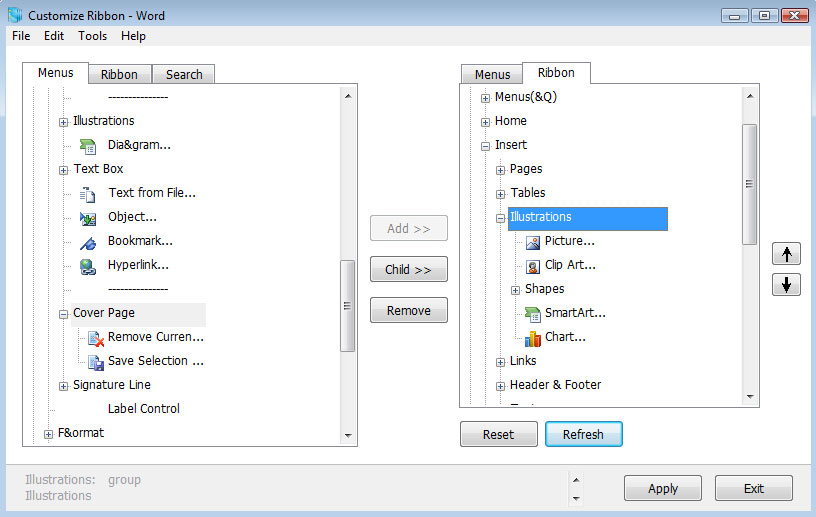
 Create your own
tabs, groups, menus and toolbars with
any commands you want.
Create your own
tabs, groups, menus and toolbars with
any commands you want.
Reorder tabs,
groups (include build-in tabs and
contextual tabs).
Easy to install and uninstall.
Quickly search and
add any controls.
You could
customize and change ribbon style of
all of Office 2007 Suites: Basic, Standard, Home
and Student, Small Business,
Professional, Professional Plus,
Enterprise and Ultimate.
Demo Movie
Where is the
Customize feature?
How to add a
build-in button?
How to create my own button
and set image/icon?
How to set Key
Tip for controls?
How to set
Keyboard Shortcut for controls?
How to set and
run Macro for controls?
This Suite Includes
Ribbon Customizer for Word 2007
Ribbon Customizer for Excel 2007
Ribbon Customizer for PowerPoint 2007
Classic Menu for Word 2007
Classic Menu for Excel 2007
Classic Menu for Access 2007
Classic Menu for Outlook 2007
Classic Menu for PowerPoint 2007
If you don't need the customizing feature, we recommend you to choose Classic Menu for Office 2007. It includes Classic Menu for Word, Excel, Access, Outlook and PowerPoint 2007.
Volume License Pricing of Ribbon Customizer for Office 2007
| No. of Licenses | Discount % | USD | EUR | GBP | AUD | CAD | JPY |
| 1 | 0% | 39.95 | 29.95 | 24.5 | 39 | 39 | 3382 |
| 2 - 4 | 15% | 33.50 |
The price varies based on the current exchange rates
|
||||
| 5 - 9 | 25% | 29.50 | |||||
| 10 - 24 | 35% | 25.50 | |||||
| 25 - 49 | 45% | 21.00 | |||||
| 50 - 99 | 55% | 17.50 | |||||
| 100 - 249 | 65% | 13.50 | |||||
| 250 - 499 | 75% | 9.50 | |||||
| 500 - 999 | 80% | 7.90 | |||||
| 1000 - 2499 | 85% | 5.90 | |||||
| 2500 - 4999 | 89% | 4.30 | |||||
| 5000 - 9999 | 92% | 3.05 | |||||
| 10000 - 24999 | 94% | 2.30 | |||||
| 25000 - 49999 | 96% | 1.55 | |||||
| 50000 + | 97% | 1.15 | |||||
*Microsoft and the Office logo are trademarks or registered trademarks of Microsoft Corporation in the United States and/or other countries.
