Where is Navigation Pane in Microsoft Access 2010 and 2013?
- Familiar way to get Navigation feature if you have Classic Menu for Office
- If you do not have Classic Menu for Office
 |
How to Bring Back Classic Menus and Toolbars to Office 2007, 2010, 2013, 2016, 2019 and 365? |
When you learn Microsoft Access 2010 at the beginning, you may find it a little hard to work because the new Ribbon which is quite different with old interface of Access 2003/XP(2002)/2000. It may waste a lot of time to seek for an original familiar button, feature, or functionality, such as the Navigation Pane. Here list two ways to seek for Navigation Pane in Microsoft Access 2010:
Familiar way to get Navigation feature if you have Classic Menu for Office
Classic Menu for Office aims to bring back old user interface of Access 2003/XP(2002)/2000:
- Click the Insert drop down menu in main menus;
- Click the Forms item;
- Then you will view the Navigation item. By this feature, you can add form tabs in vertical or horizontal.
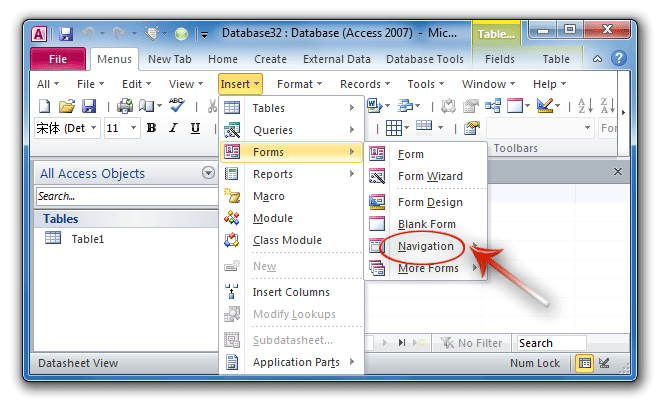
Figure 1: Show Navigation Pane from Classic Menu
Get Navigation in Ribbon if you do not have Classic Menu for Office
- Click the Create tab;
- Go to the Forms group;
- Then you will view the Navigation button.
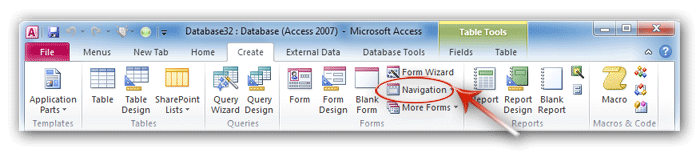
Figure 2: Show Navigation Pane in Access 2010 Ribbon

Classic Menu for Office
Frustrated by endless searches for commands on the ribbon interface of Access? The Classic Menu for Office brings back the familiar menus and toolbars to Microsoft Access 2007, 2010, 2013, 2016, 2019 and 365. The classic view allows you to work with Office 2010/2013/2016 as if it were Office 2003/2002/2000.
- All new features and commands for Access 2007, 2010, 2013, 2016, 2019 and 365 have been added to the menus and toolbars.
- You can still enjoy many features of Access 2003 that have been removed from Access 2007, 2010, 2013, 2016, 2019 and 365.
- You won't need any training or tutorials after upgrading to Microsoft Access 2007, 2010 or 2013.
Classic Menu for OfficeIt includes Classic Menu for Word, Excel, PowerPoint, Access, Outlook, Publisher, InfoPath, Visio and Project 2010, 2013, 2016, 2019 and 365.
|
||
 |
Classic Menu for Office 2007It includes Classic Menu for Word, Excel, PowerPoint, Access and Outlook 2007.
|