


Recover Classic Menus and Toolbars in Microsoft Access 2010, 2013, 2016, 2019 and 365
Classic Menu for Access


Have you tried the Microsoft® Access® 2010, 2013, 2016, 2019 or 365? If you have spent a lot of time adjusting yourself to the Ribbon interface of Microsoft Access 2010, 2013, 2016, 2019 or 365, or being frustrated by searches for new features on the Ribbon interface, here is a solution to save your time for the transition, Classic Menu for Access.
 Classic Menu for Access 2010/2013/2016/2019 ties Microsoft Access 2003 and Microsoft Access 2010/2013/2016/2019. It shows Classic Menus and Toolbars on the Ribbon of Microsoft Access 2010, 2013, 2016, 2019 and 365.
All new features of Access 2010, 2013, 2016, 2019 and 365 have been added into the software. You don't need any training or tutorials if you use Access 2003/XP/2000 before.
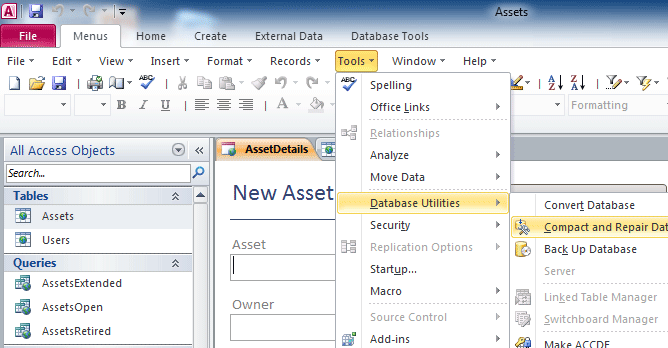
Classic menus and toolbars in Access 2010
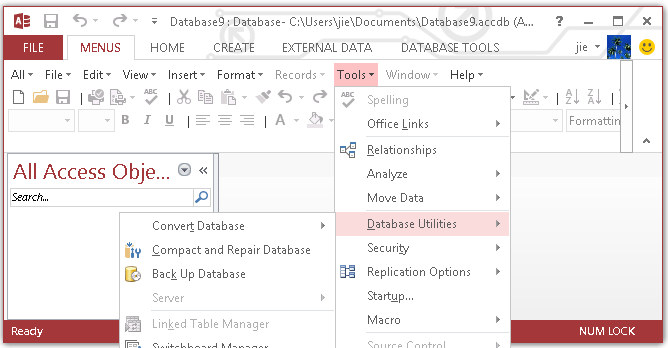
Classic menus and toolbars in Access 2013
- More screen shots of menus and toolbars
- More demo movies of menus and toolbars
No more puzzles with the new scattered Ribbon, quickly get the exact buttons and menus and save time.
Not only remain the original toolbars and buttons, but also contain all new functions of Microsoft Access 2010, 2013, 2016, 2019 and 365. The software works fine with Microsoft Access Runtime version.
Support all languages that supported by Microsoft® Access 2010, 2013, 2016, 2019 and 365: English, French, German, Italian, Spanish, Portuguese, Japanese, Arabic, Korean, Chinese, and more.
Free Trial for 15 daysand 60-day Money Back Guarantee are provided for our users. What’s more, users are able to freely update and get support.
Fully compatible with Microsoft® Windows® 10/8/7/Vista (32/64), XP, Windows Server 2003/2008/2012/2016 (32/64), Windows Terminal (Remote Desktop) Server and Citrix System;
Easily manage classic menu and toolbars in Classic Menu Manager;
Easily show or hide Classic Menu and toolbars in Access 2010/2013/2016/2019;
The classic menu can stay at far right of Ribbon, or between "File" and "Home" tabs in Ribbon;
The Microsoft Access 2003 interface can be positioned along with the Ribbon of Access 2010/2013/2016/2019 or you can completely overlay the latter.
easily show or hide "Menus" tab in the Ribbon;
Original shortcuts are available. Press Alt, Q, Y1, and you can use the familiar keyboard shortcuts again.
Quickly find and execute the command that you want.
The setup package is only12 - 14 MB, fast install and uninstall;
*Microsoft and the Office logo are trademarks or registered trademarks of Microsoft Corporation in the United States and/or other countries.










