Where Is the Tools Menu in Microsoft Excel 2007, 2010, 2013, 2016, 2019 and 365
The ribbon interface in Excel 2007, 2010, 2013, 2016, 2019 and 365 has distributed and grouped menus and toolbars under different tabs. While this grouping is convenient, some users find it difficult to locate specific commands, earlier found in the tools menu, across different tabs.
 |
How to Bring Back Classic Menus and Toolbars to Office 2007, 2010, 2013, 2016, 2019 and 365? |
If you are a fan of the classic style interface, finding a specific function, from the former Tools menu, in the new ribbon interface can be a challenge! But with Classic Menu for Excel 2007/2010/2013, the same task can be super simple! For example,
- If you don't have the Classic Menu for Excel 2007/2010/2013/2016/2019 installed, you have to…
- But with the Classic Menu for Excel 2007/2010/2013/2016/2019 installed, you can…
If you have not Classic Menu for Excel 2007/2010/2013/2016/2019 installed, you have to…
Find each function by clicking on different tabs. The ribbon interface has abandoned the menus and toolbar style, and the functions in the former locations have been regrouped. For example, the Spelling function has been moved to the Review tab, and listed under the Proofing functions. The Protection function has also been moved to the Review tab, and is listed under the Changes group.
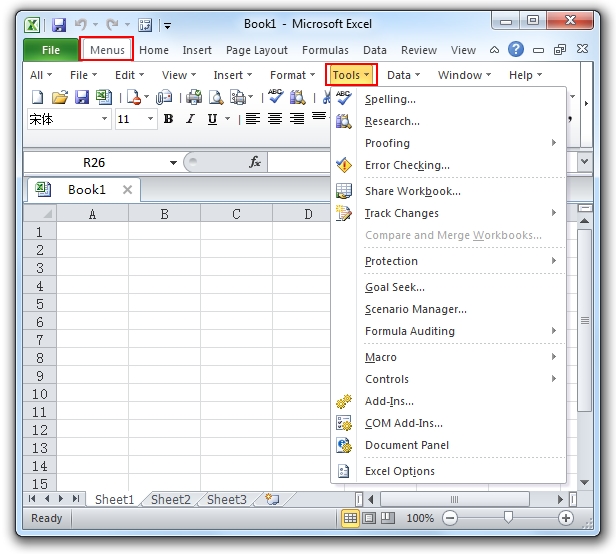
But with the Classic Menu for Excel 2007/2010/2013/2016/2019 installed, you can …
Click the Menus tab to experience the classic style interface and find the Tools menu easily. Click the arrow next to the Tools to access the familiar functions from the dropdown menu.
 More Related Articles...
- Where is Conditional Formatting
- Where is Page Setup
- Where is Tools Menu
- Where is Undo
- Where is Macro
- Where are Pivot Table and PivotChart Wizard
- Where is Print Preview
- Where is Help Button
- Where is Goal Seek
- Where is Edit Menu
- Where is Decrease Decimal Button
- Where is Specify Decimal Place
Classic Menu for Office
Brings the familiar classic menus and toolbars back to Microsoft Office 2007, 2010, 2013, 2016, 2019 and 365. You can use Office 2007/2010/2013/2016 immediately without any training. Supports all languages, and all new commands of 2007, 2010, 2013, 2016, 2019 and 365 have been added into the classic interface.
Classic Menu for OfficeIt includes Classic Menu for Word, Excel, PowerPoint, OneNote, Outlook, Publisher, Access, InfoPath, Visio and Project 2010, 2013, 2016, 2019 and 365.
|
||
 |
Classic Menu for Office 2007It includes Classic Menu for Word, Excel, PowerPoint, Access and Outlook 2007.
|



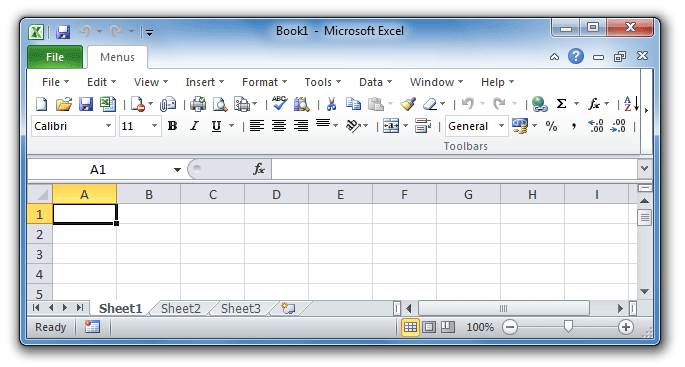
Screen Shot of Classic Menu for Excel